
A frequent question people ask me as a social media agency owner is: how do you manage and schedule content for multiple clients across multiple platforms? I think the more important question is, how do we do this at TMSC without going completely insane?
Social media management for just one brand can be time consuming and creatively exhausting. Doing it for multiple brands is a discipline all in itself. There are so many potential pitfalls one needs to avoid - from spelling mistakes to forgetting to add something the client specifically asked for (and reminded you via Whatsapp multiple times!)
I think every social media manager has woken up in a cold sweat thinking about that post they completely forgot to schedule. Or remembering that a client asked for something, but you can’t for the life of you find their message, and can’t remember exactly what they said!
The good news is, there are some great social media scheduling tools on the market that can streamline this process. And when it comes to managing multiple clients, it really is all about having strong processes that allow you to embrace your creativity, while getting it all done! One thing I always tell people in our social media Power Hour sessions (where we give people top level guidance and coaching for their social media strategy) is that every strategy needs strong, realistic processes so that it can actually be executed.
Since I launched TMSC almost 6 years ago, I have tried pretty much every social media scheduler on the market. We originally started out using Meta Business Suite. However, I am convinced Meta actually hates social media managers. I can’t tell you how many bugs the platform has, and how many times it got us into hot water by double, triple or even quadruple posting.
Currently, we personally love using a social media scheduling tool called Pallyy. Pallyy is a scheduling tool built for people who run social for more than one brand, including agencies and freelancers. The best part is, they are Australian. And we love supporting our Aussie businesses. It’s a very straightforward platform, without the bloat (which is something I hate!) so it delivers good value for money, which is always a good thing for a small agency struggling with margins.
Pricing for Pallyy is per brand, not per social channel. Prices start from $25/month, so adding Instagram, Facebook, LinkedIn, etc. on the same brand does not multiply the cost. I think we can all agree that $25 is well worth it for a tool that just works, and cuts out the stress.
Let us take you through some of the really cool features that help social media agencies get the job done!
Visual Content Calendar:
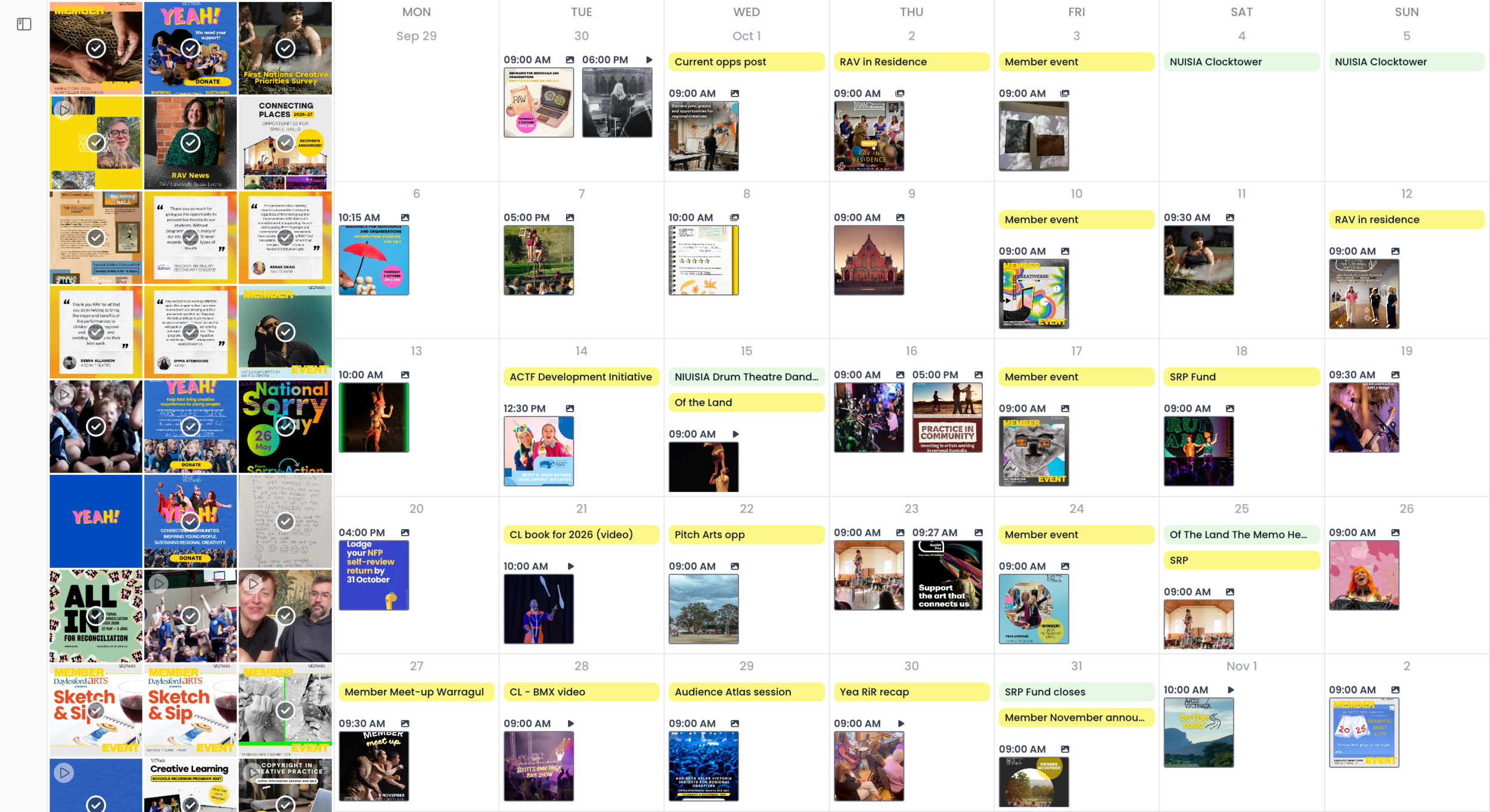
Us social media managers are visual people. Branding is really all about building a visual universe, afterall. The visual content calendar means you can see the week/month across brands at a glance. This is personally one of my favourite features, as I’m a very visual person and need to see how the posts flow together to tell a visual story. I think a common mistake Social Media Managers make is not considering the flow of their posts - how it all comes together! There is no point in having an awesome standalone post if it clashes visually with the post next to it. This can really cheapen a brand.
Client Approvals:
Pallyy lets you send posts for sign-off before they go live, which means we are able to collate feedback all in one place, without getting confused by requests coming from text, Whatsapp, email etc. If it’s not in Pallyy, we won’t be actioning it! Stop texting me at midnight people! Because we have a team of people working on every client at TMSC, organisation and communication is key to avoid double handling. I love that each post has a status update, so we can all see what is pending or approved.
Community Management:
Pallyy has a unified inbox for comments and messages in one place, which is a lifesaver for providing community management - and not missing something! There is nothing worse than finding a 6 week old DM in your IG requests folder and having that sinking feeling that you just cost your client a new customer.
Client Reports
We pride ourselves on giving really in depth, valuable reports each month here at TMSC. But reporting can be so time consuming, and the social media platforms don’t exactly make the process smooth and easy. Having the ability to collate reports on Pallyy is a game changer and saves us so much time. Because you can export as PDF, you can build out reports really quickly and efficiently.
If you’d like to see Pallyy for yourself, you can sign up free at pallyy.com. We’d love to know what you think of the platform once you’ve tried it too!